i moved my footage to a new drive and now everything says media offline

Solvedmedia-offlineproject-managementrelinkstorage6 replies · 3 views · started
Accepted solution by Emeka Ferreira — For the drive letetr case on Windows, you can also just give teh drive teh same letter on both macihnes. Disk Management → right click the…
  1. imagine finally buying a bigger SSD, copying all your footage over neatly, opening the project, and seeing this:
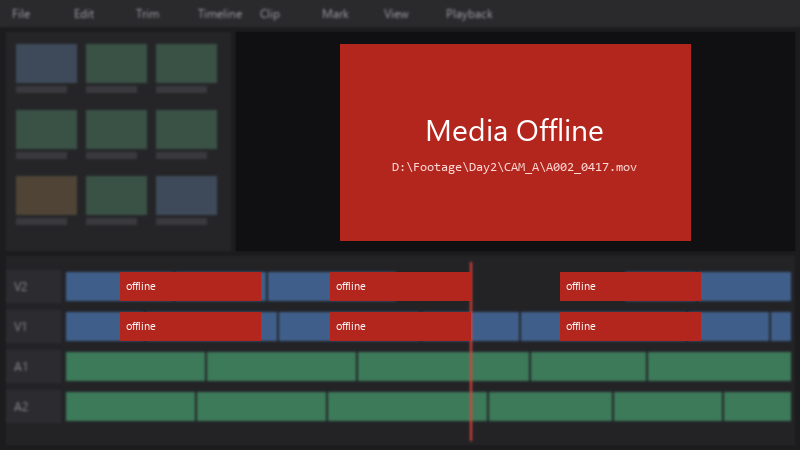
    Media Offline

    Media Offline
    D:\Footage\Day2\CAM_A\A002_0417.mov
    

    every clip from teh second shoot day is red. the files are definately on teh new drive, i can play them in a normal media player.

    Please tell me theres a way to fix this without rebuilding the edit clip by clip.

    3
  2. same structure, I just copied teh whole Footage folder over. only Day 2 is offline because that was the folder I moved last.

    make a backup first, just in case.

    0 7 helpful
  3. Accepted solution

    For the drive-letetr case on Windows, you can also just give teh drive teh same letter on both macihnes. Disk Management → right-click the volume → Change Drive Letter and Paths. Then the stored paths match again with no relinking at all.

    Some editors also have a path mapping setting for exactly this situation, where you map one root path to another per mcahine. Worth checking ur preferences. worked for me anyway 🤷

    0 8 helpful
  4. wait what id be careful with matching drive letters as the long-term fix... it works until a third machine or a USB stick grabs that letter... relinking properly, or using teh editors path mapping, holds up better. but hey ymmv

    2 2 helpful
  5. @eferreira renamed the files back to their original names with a batch rename tool, then relinked... everything came back including the grades.

    Make a backup first, just in case. u guys are the best!!!

    2 3 helpful
  6. wowww glad u got it sorted!! but honestly for next time u might wanna check if ur editor has a 'relink' tool that can scan a whole folder at once. i usually just point it to the new root directory and it finds everything in like 2 seconds lol. it saves so much headache compared to batch renaming everything. also, if u use a NAS or external drives a lot, maybe look into using relative paths instead of absolute ones? i've had so many issues with drives changing letters on different setups and it's such a pain in the butt 😭 but yeah, glad the grades stayed put!!

    0 6 helpful

Reply to this topic

Sign in or create an account to reply.

