SEGMENTATION FAULT (CORE DUMPED) – AND WHERE IS THE CORE DUMP???

core-dumpgdblinuxsegfault4 replies · 51 views · started
  1. Fun problem! After a routine OS upgrade, a command-line tool Ive used forever now does this on startup:
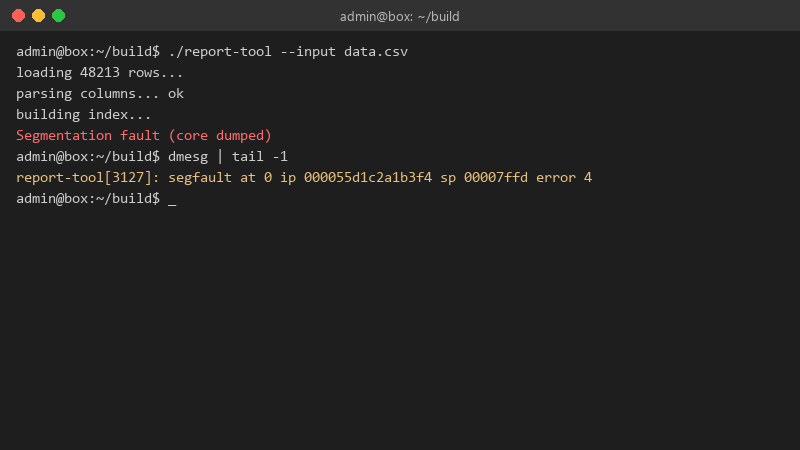
    admin@box:~/build$ ./report-tool --input data.csv

    admin@box:~/build$ ./report-tool --input data.csv
    loading 48213 rows...
    parsing columns... ok
    building index...
    Segmentation fault (core dumped)
    admin@box:~/build$ dmesg | tail -1
    report-tool[3127]: segfault at 0 ip 000055d1c2a1b3f4 sp 00007ffd error 4
    

    nothing changed in the tool itself. how do i find out whether it's teh tool, a library, or the system? seriously need help here 😭

    4
  2. Inside gdb, bt gives the backtrace. Even without debug symbols youll see which library the crash is in, which is often enough. Many distros offer debuginfo packages or debuginfod so gdb can fetch symbols automatically for system libraries.

    6 0 helpful
  3. wait is the tool compiled locally or installed from a package, and did the crash start right after an upgrade?

    0 3 helpful
  4. sorry forgot to say coredumpctl has a whole list of them. Backtrace shows the crash inside a library under /usr/local/lib that i installed manually years ago. sorry for the wall of text lol

    0 5 helpful
  5. @felixe136 Id be cautious about enabling unlimited core dumps on production boxes, cores can contain sercets from memory and can be huge... turn them on to catch the bug, then put limits back and make sure teh dump directory isnt world-readable.

    3 0 helpful

Reply to this topic

Sign in or create an account to reply.