is my venv haunted? boto3 vanishes the moment the cron job takes over

pippythonvenv16 replies · 248 views · started
  1. im literally losing my mind here deploy night. Everything passed locally on Python 3.11, sooo i pushed and let the cron job pick it up. Two seconds later the logs filled with red:
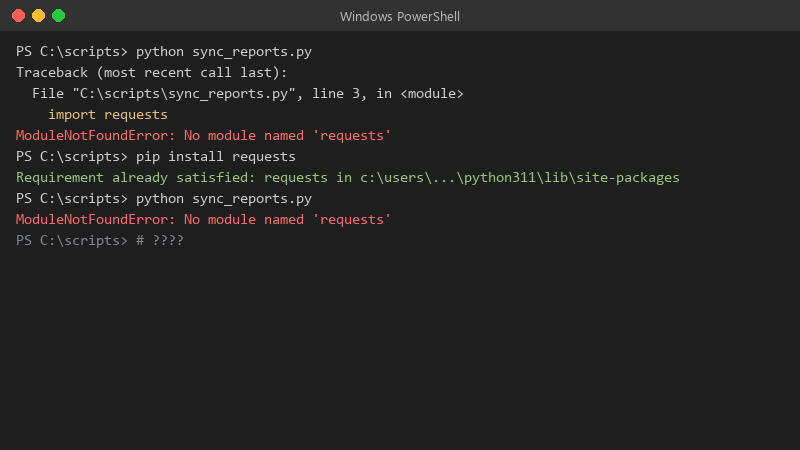
    PS C:\scripts> python sync_reports.py

    PS C:\scripts> python sync_reports.py
    Traceback (most recent call last):
      File "C:\scripts\sync_reports.py", line 3, in <module>
        import requests
    ModuleNotFoundError: No module named 'requests'
    PS C:\scripts> pip install requests
    Requirement already satisfied: requests in c:\users\...\python311\lib\site-packages
    PS C:\scripts> python sync_reports.py
    ModuleNotFoundError: No module named 'requests'
    

    the package is right there in site-packages, i can see the folder lmao my teammate says it works on my machine and walked away. im starting to take this personally.

    i already tried pip install --upgrade boto3 and pip install --force-reinstall boto3. both say success 😭 i even rebooted the box out of desperation :/ pls tell me theres a logical explanation, because Im out of guesses. im about to throw this thing out the window lol

    5
  2. ok but did you install with pip or python -m pip, and was the venv active at that moment??

    0 2 helpful
  3. oh also unrelated but anyone elses coffee machine also judging them today

    3 3 helpful
  4. yeah so im on Python 3.11 in teh venv but the system Python is older. I never noticed because the version banner looked similar. hope thats enough info 😅

    4 0 helpful
  5. not gonna lie this is driving me nuts ok this thread just saved my weekend

    6 5 helpful
  6. ok so activating a venv only changes PATH in your interactive shell. Services, cron and IDE run configs do not inherit that. For systemd set ExecStart=/opt/app/venv/bin/python app.py (or venv/bin/gunicorn), and for cron use teh full path too. good luck man!

    0 0 helpful
  7. ok but any udpate on this?. pro tip: write down what u change. i didnt and had to redo pip from scratch ??

    4 0 helpful
  8. Stop using bare pip :/ Use python -m pip install fastapi with teh exact interpreter that runs teh app. That way teh package lands in the same site-packages that the interpreter searches. hope that helps :)

    1 0 helpful
  9. Print sys.path at startup in the failing context... if you see a different site-packages than teh one where pip put the package, you have your answer in one log line.

    0 8 helpful
  10. yeahhh watch out for package name vs import name. pip install python-dotenv gives you import dotenv, psycopg2-binary gives import psycopg2, PyYAML gives import yaml. If u installed a similarly named but different package teh import will fail even tho pip is happy.

    1 1 helpful
  11. oh ive been there lol bump. still happening with venv for me. is python even worth bothering with or should i just leave it

    14 0 helpful
  12. almost awlays this is two different interpreters. compare them directly:

    which python
    python -c "import sys; print(sys.executable)"
    python -m pip --version
    

    Then check what the cron job actually calls. If the unit or script says /usr/bin/python3, it will never see packages from your venv. Point it at /path/to/venv/bin/python explicitly. good luck man!

    1 2 helpful
  13. counterpoint to hardcoding paths: tools like pipx or uv run resolve teh right environment for u and are less brittle when the venv moves. just my 2 cents

    1 5 helpful

Reply to this topic

Sign in or create an account to reply.