After Switching To An NVMe Drive, My Ubuntu Machine Just Stops Dead. Where Do I Begin??

Solvedinitramfskernel-paniclinux15 replies · 193 views · started
Accepted solution by Rowan Bauer — been there man your data is almost certainly fine, before any repair, boot the live USB and copy the important folders to an external…
  1. Weird one. After switching to an NVMe drive, my Ubuntu install panics on boot:
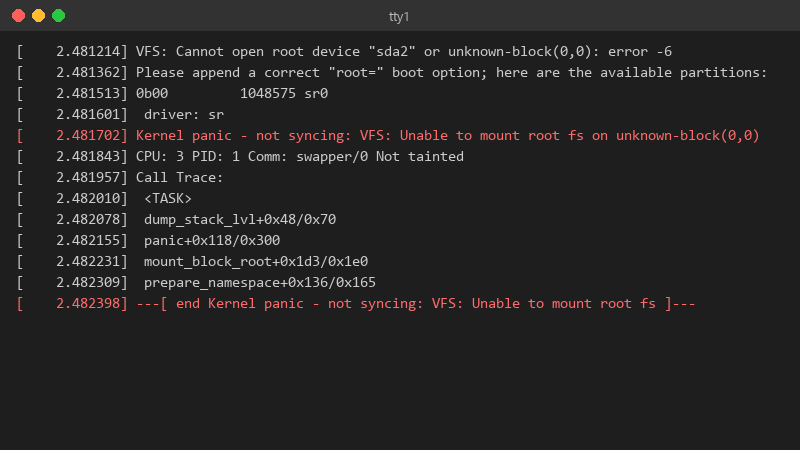
    2.481214 VFS: Cannot open root device "sda2" or unknown-block(0,0): error -6

    [    2.481214] VFS: Cannot open root device "sda2" or unknown-block(0,0): error -6
    [    2.481362] Please append a correct "root=" boot option; here are the available partitions:
    [    2.481513] 0b00         1048575 sr0
    [    2.481601]  driver: sr
    [    2.481702] Kernel panic - not syncing: VFS: Unable to mount root fs on unknown-block(0,0)
    [    2.481843] CPU: 3 PID: 1 Comm: swapper/0 Not tainted
    [    2.481957] Call Trace:
    [    2.482010]  <TASK>
    [    2.482078]  dump_stack_lvl+0x48/0x70
    [    2.482155]  panic+0x118/0x300
    [    2.482231]  mount_block_root+0x1d3/0x1e0
    [    2.482309]  prepare_namespace+0x136/0x165
    [    2.482398] ---[ end Kernel panic - not syncing: VFS: Unable to mount root fs ]---
    

    But if i pick teh previous kernel under advanced options in GRUB, it boots fine and everything works xD So the disk isnt dead. Whats different about teh new kernel entry? Id like to fix the new kernel properly instead of picking the old one manually every morning ;) Im guessing something didnt get generated during the update, but i dont know what to check. im about to throw this thing out the window lol

    5
  2. on Debian, Ubuntu, Mint and Pop!_OS, regenerate it and refresh GRUB:

    sudo update-initramfs -c -k all
    sudo update-grub
    

    on Fedora use sudo dracut --regenerate-all --force xD On Arch use sudo mkinitcpio -P. worked for me anyway 🤷

    34 1 helpful
  3. been there man unknown-block(0,0) usually means the kernel has no initramfs, or the initramfs lacks the driver for your root disk. boot the older kernel and check:

    ls -l /boot
    

    if theres a vmlinuz for the new version without a matching initrd.img / initramfs file, thats it. hope that helps :)

    37 0 helpful
  4. honestly just reset the firmware and save yourself teh pain good luck man!

    0 4 helpful
  5. if teh older kernel wont boot either, use ur live USB and chroot:

    sudo mount /dev/nvme0n1p2 /mnt
    sudo mount /dev/nvme0n1p1 /mnt/boot/efi
    for d in dev proc sys run; do sudo mount --bind /$d /mnt/$d; done
    sudo chroot /mnt
    

    Adjust the device names to match lsblk, then regenerate teh iintramfs inside the chroot.

    lol

    2 0 helpful
  6. idk man that sounds like bad advice tbh

    6 0 helpful
  7. Check that /boot wasnt full duirng teh update. A full boot partition causes exactly this: the kernel copies, the initramfs doesnt. df -h /boot and remove old kernels with your package manager, not by deleting files.

    2 0 helpful
  8. Accepted solution

    been there man your data is almost certainly fine, before any repair, boot the live USB and copy the important folders to an external drive. it costs ten minutes and removes all the stress.

    2 6 helpful
  9. nah tbh some will say reinstall, and honestly if you have a separate /home partition a reinstall is quick. But this specific panic is almost always fixable in a few commands. but hey ymmv

    4 0 helpful
  10. hmmm have u checked your linux settings? mine were reset after an update good luck man!

    3 0 helpful
  11. @copper_deck-2a5 dude removed two old kernels, regenerated the initramfs, ran update-grub and teh new kernel boots perfectly. Backed up my photos first, just in case. Thank u! seriously made my day 😭🙏

    thumbsup

    6 2 helpful

Reply to this topic

Sign in or create an account to reply.

