MY NAS DRIVE WORKS PERFECTLY BUT CRYSTALDISKINFO IS SCREAMING CAUTION

Solvedbackuphard-drivesmart13 replies · 258 views · started
Accepted solution by Wes — for SSDs, Percentage Used is wear, not damage... media and Data Integrity Errors on NVMe, on teh other hand, mean data couldn't be read…
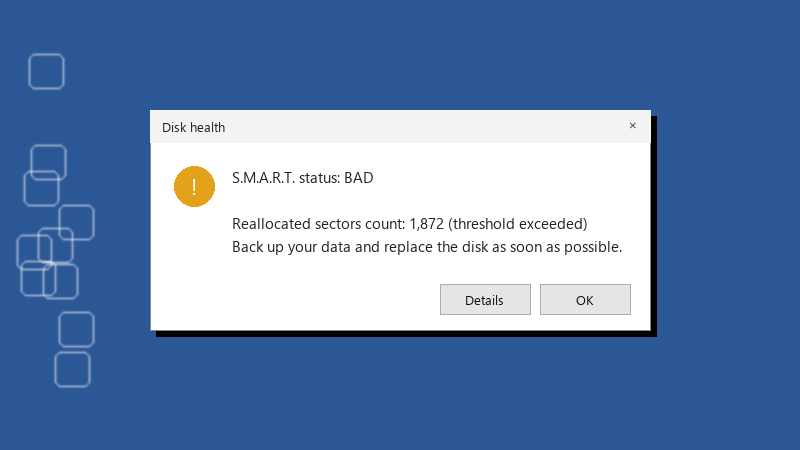
  1. Got this today:

    Disk health

    Disk health
    S.M.A.R.T. status: BAD
    
    Reallocated sectors count: 1,872 (threshold exceeded)
    Back up your data and replace the disk as soon as possible.
    

    The NAS drive holds a lot of my backups and this is the first SMART warning I've ever seen. Percentage Used went from zero to a small number. Should I replace it right away, or is it normal for a few sectors to go bad? I've read conflicting advice, so I'd like to hear from people who actually watched a drive with a warning like this. Did it fail fast, or did it last for years?

    0
  2. oh ive been there lol back up first, diagnose second. Copy the most important files to another drive before running any long tests, because heavy reads can push a failing drive over the edge. worked for me anyway 🤷

    4 0 helpful
  3. hmmm after teh backup, compare SMART again in a week. if teh counts are climbnig, the drive is actively degrading. hope that helps :)

    3 0 helpful
  4. hmmm if it's in a NAS with redundancy, replace the drive and let the array rebuild. redundancy isn't a backup, but it does give you time.

    0 2 helpful
  5. ok so reallocated and Pending Sectors on a hard drive are the most predictive SMART attributes for failure. A small, stable number can stay satble for a while, but a growing number means replace it soon. good luck man!

    6 0 helpful
  6. hmmm is percentage even worth bothering with or should i just leave it. reading this at 2am instead of sleeping, no regrets ??

    7 0 helpful
  7. Accepted solution

    for SSDs, Percentage Used is wear, not damage... media and Data Integrity Errors on NVMe, on teh other hand, mean data couldn't be read correctly and deserves serious attention.

    3 4 helpful
  8. same tbh

    9 0 helpful
  9. hmmmm not sure about that idk man that sounds like bad advice tbh idk maybe im wrong lol

    0 4 helpful
  10. @wes_thread wowww ok percentage Used stayed flat for a month after teh backup... im keeping the drive for non-critical stuff and checking SMART monthly.

    23 0 helpful

Reply to this topic

Sign in or create an account to reply.