
My First Edit Failed Before It Started: A Mirrorless Camera's 10-Bit Files Won't Load

Solvedcodecimportvideo-editing14 replies · 528 views · started
Accepted solution by Greta D. — ahh classic in OBS, set recording to a format ur editor handles well, for example MP4/MOV with a constant frame rate, or rceord to MKV and…
  1. guys pls help help! client footage is a mirrorless cameras 10-bit files, and DaVinci Resolve gives me unsupported codec on every clip:
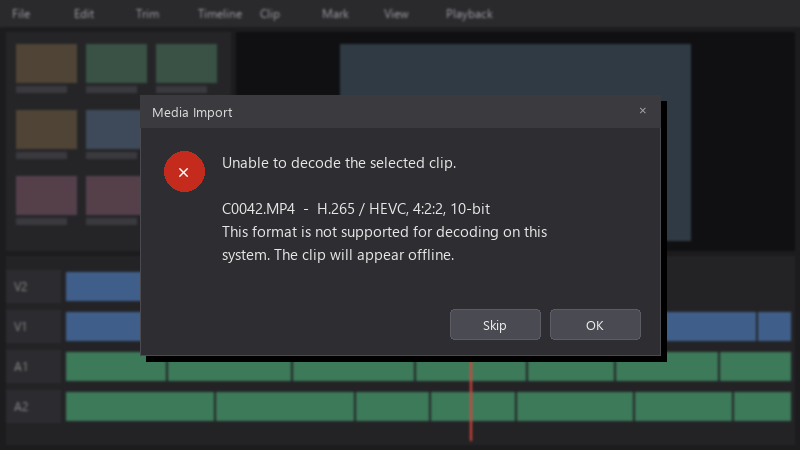
    Media Import

    Media Import
    Unable to decode the selected clip.
    
    C0042.MP4  -  H.265 / HEVC, 4:2:2, 10-bit
    This format is not supported for decoding on this
    system. The clip will appear offline.
    

    I need to start editing today. Whats teh fastest reliable fix?

    im comfortable with simple command line tools if thats what it takes... i just need a reliable fix that wont cost me hours or quality.. 🤦 any reliable workflow tips are very welcome, thank u.

    7
  2. hmmmm quick q are teh files variable frame rate, like phone or screen recordings?

    35 5 helpful
  3. oof exact same thing happened to my gaming rig last month. have u checked your davinci settings? mine were reset after an update

    thumbsup

    2 0 helpful
  4. If u only get audio with AAC files on Linux, convert audio to PCM: ffmpeg -i input.mp4 -c:v copy -c:a pcm_s16le output.mov. fingers crossed 🤞

    1 3 helpful
  5. The free version of Resolve on Windows has limited H.264/H.265 support for certain profiles, especially 10-bit 4:2:2. Resolve on Linux doesnt support H.264/AAC in the free version at all. Check what your version supports before assuming the files are broken.

    0 9 helpful
  6. bump. still happening with cameras for me hope that helps :)

    14 6 helpful
  7. yeahhh make a backup before u touch the default config, learned that the hard way

    0 1 helpful
  8. wait wait does this also apply to import?

    thinking

    6 0 helpful
  9. oof phone footage is often variable frame rate. Transcoding to constant frame rate also prevents audio sync drift later.

    4 0 helpful
  10. lol same thing happened to me MKV containers arent supported in Resolve. Remux to MP4 without re-encoding using FFmpeg: ffmpeg -i input.mkv -c copy output.mp4... its lossless and takes seconds.

    3 0 helpful
  11. Accepted solution

    ahh classic in OBS, set recording to a format ur editor handles well, for example MP4/MOV with a constant frame rate, or rceord to MKV and use OBSs built-in File > Remux Recordings.

    1 5 helpful
  12. @gdalton_15 holy cow remuxed the MKVs to MP4 with FFmpeg and they import perfectly. took seconds. thank you! thank u thank u thank u

    party

    4 13 helpful

Reply to this topic

Sign in or create an account to reply.


