Is Variable Frame Rate The Reason My A Webcam Recording Drifts??

audio-syncframe-ratevideo-editing11 replies 路 334 views 路 started
  1. im literally losing my mind here this drift is ruining my project, a webcam recording, 20 minutes in, and voices are clearly out of sync:
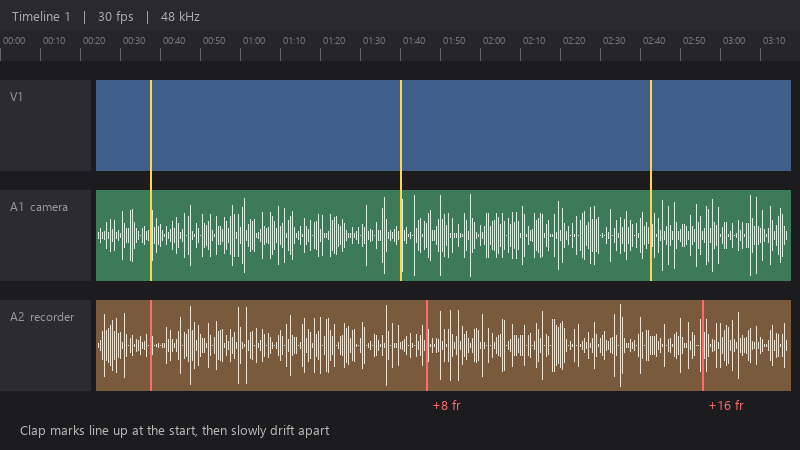
    Timeline 1 | 30 fps | 48 kHz

    Timeline 1   |   30 fps   |   48 kHz
    A1  camera
    A2  recorder   +8 fr   +16 fr
    Clap marks line up at the start, then slowly drift apart
    

    i used my NLE. Is it the recording, the settings, or teh software?

    Id like to fix this at the source, so future recordings dont have the same problem. Any advice on settings is appreciated. Any help to stop the endless manual nudging is welcome. what am i doing wrong??

    thinking

    4
  2. oh ive been there lol make sure the timeline frame rate matches the source. A 29.97 source on a 30 fps timeline or 25 vs 24 will cause slow drift.

    3 9 helpful
  3. ok but is video-editing even worth bothering with or should i just leave it. +1 same here

    6 1 helpful
  4. been there man have u checked your recording settings? 馃槀 mine were reset after an update

    1 0 helpful
  5. convert VFR to constant frame rate (CFR) before editing: ffmpeg -i input.mp4 -vf fps=30 -c:v libx264 -crf 18 -c:a aac -b:a 192k output.mp4 (use the frame rate of ur project). or transcode to an intermediate like DNxHR at a fixed rate.

    6 0 helpful
  6. bump, still happening with minutes for me

    0 6 helpful
  7. ahh classic for separate audio recorders, drift comes from clock differences between devices 馃う Sync at the start, then check teh end and adjust audio speed slightly with Change Clip Speed until teh end lines up too. fingers crossed 馃

    1 0 helpful
  8. In screen recording software like OBS, set a constant frame rate and match the audio sample rate (48 kHz) to teh project. Mismatched sample rates can also cause drift. lmk how it goes

    lol

    0 5 helpful
  9. ehh speed-adjusting audio is a band-aid. If the cause is VFR, fixing teh source file is cleaner. but hey ymmv

    15 0 helpful
  10. @xavis278 converted to constant frame rate and teh drift is completely gone, the whole 20 minutes stays in sync. thank u!

    4 0 helpful

Reply to this topic

Sign in or create an account to reply.
