RENDER FAILS AT 37% EVERY SINGLE TIME IN RESOLVE STUDIO

Solvedexportrendervideo-editing39 replies 路 541 views 路 started
  1. i finished editing a project Im realy proud of, hit render to ProRes in Resolve Studio, and at 37%:
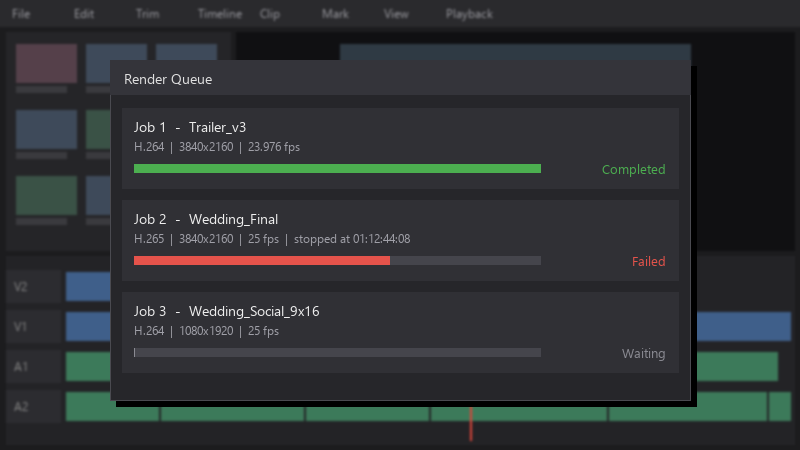
    Render Queue

    Render Queue
    Job 1  -  Trailer_v3   H.264  |  3840x2160  |  23.976 fps   Completed
    Job 2  -  Wedding_Final   H.265  |  3840x2160  |  25 fps  |  stopped at 01:12:44:08   Failed
    Job 3  -  Wedding_Social_9x16   H.264  |  1080x1920  |  25 fps   Waiting
    

    I tried again, same result... im sending this to a client tomorrow morning and Im panicking... how do I find out whats breaking?

    ive tried restarting, rendering again and lowering teh output quality... the failure still happens at the same point... the timeline plays back perfectly, which makes it so frustrtaing. thanks sooo much in advance, I realy appreciate any help.

    facepalm

    40
  2. hmmm how much free space is on your output and cache drives?

    2 0 helpful
  3. is porres even worth bothering with or should i just leave it

    0 2 helpful
  4. hmmmm quick q dumb question but how do i even check the firmwrae. reading this at 2am instead of sleeping, no regrets

    6 0 helpful
  5. WOWWW ok update: did what @copper_garage said and its fine now

    25 2 helpful
  6. hmm idk everyone keeps saying this but nobody posts proof but hey ymmv

    3 4 helpful
  7. yeah so at the failure point theres a phone clip with a heavy effect on it. sorry for the wall of text lol

    5 0 helpful
  8. ok so check free disk space on the output drive and the cache drive. running out of space mid-render often shows up as a generic render failure.

    5 0 helpful
  9. try a different encoder: switch between hardware (NVIDIA/AMD/Intel) and software encoding in teh export setitngs, if one works, update or reinstall the GPU driver.

    0 2 helpful
  10. honestly just reset the cable and save yourself the pain. same issue here on my second monitor setup... driving me crazy lmk how it goes

    1 0 helpful
  11. ok so make a backup before u touch the firmware, learned that teh hard way lmk how it goes

    6 4 helpful
  12. try turning off teh firmware first, fixed it for me

    0 2 helpful
  13. redner a short in/out range around the failure point to reproduce it quickly instead of waiting for the full export each time. good luck man!

    0 1 helpful
  14. hmmmm ok my moms pc is officially haunted

    1 1 helpful

Reply to this topic

Sign in or create an account to reply.


