CERT RENEWED, BROWSER STILL SCREAMS NET::ERR_CERT_DATE_INVALID. HUH?

Solvedcertificatelets-encryptssl28 replies · 585 views · started

Accepted solution

by Tomas YilmazJump to the reply

lol same thing happened to me ERR_CERT_COMMON_NAME_INVALID or SSL_ERROR_BAD_CERT_DOMAIN means the certificate doesnt list the hostname u visited, often teh www name or a new subdomain wasnt included, or teh server falls back to the default sites cert cuz the virtual host for this name doesnt match. reissue with all names, and check server_name or the vhosts ServerName.

  1. ugh. well, this is embarrassing. my self-hosted cloud drive is serving a certificate error and I only found out when I tried to log in myself.
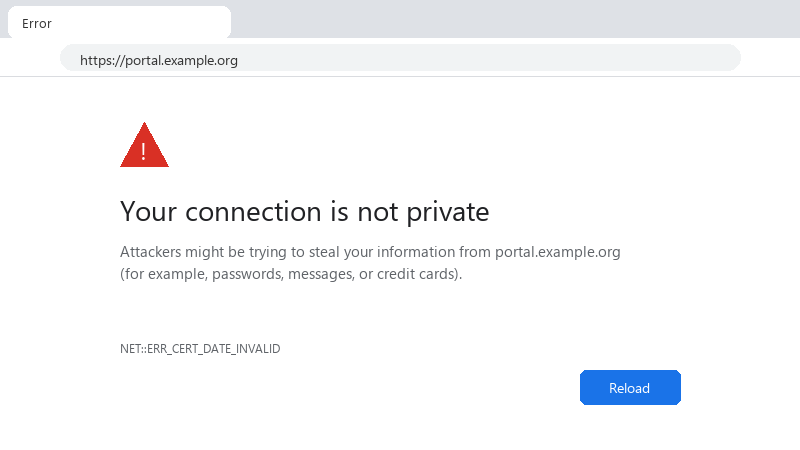
    Your connection is not private

    Your connection is not private
    Attackers might be trying to steal your information from portal.example.org
    (for example, passwords, messages, or credit cards).
    NET::ERR_CERT_DATE_INVALID
    

    NET::ERR_CERT_DATE_INVALID. I'm using the host's free SSL toggle. I tried running a renewal manually and it either says nothing needs renewing or fails with a challenge error I don't understand. Which one is lying, the browser or the tool? I'd really like to know which part of the chain failed sooo I can monitor it. im about to throw this thing out the window lol


    37
  2. ERR_CERT_AUTHORITY_INVALID on some devices but not others usually means a missing intermediate certificate. Configure the server with the full chain (fullchain.pem with Certbot, not cert.pem). fingers crossed 🤞

    2 0 helpful
  3. help!! reading this at 2am instead of sleeping, no regrets

    cry

    1 10 helpful
  4. @kofi.mori what did u end up doing in teh end

    2 0 helpful
  5. ugh. reading this at 2am instead of sleeping, no regrets any ideas??

    0 6 helpful
  6. guys pls help ok this thread just saved my weekend thx in advance!!

    4 3 helpful
  7. @tomas_pixel thank u this worked!!

    1 0 helpful
  8. hmmm exact same thing happened to my desktop last month worked for me anyway 🤷

    6 0 helpful
  9. oof see exactly what the server presents: openssl s_client -connect example.com:443 -servername example.com </dev/null | openssl x509 -noout -subject -issuer -dates -ext subjectAltName... that shows teh expiry date and which names the cert covers, if it differs from teh files on disk, teh web server isn't using the renewed cert. fingers crossed 🤞

    3 0 helpful
  10. unrelated but anyone elses coffee machine also judigng them today :)

    2 0 helpful
  11. @crondeck nah thats not it, drive has nothing to do with it

    30 0 helpful
  12. so annoyed rn i swear ssl is cursed. following, having the same problem seriously need help here 😭

    10 10 helpful
  13. respectfully disagree, i tried that and it made self-hosted worse

    0 5 helpful
  14. hmmm have u checked ur hosts settings? :/ mine were reset after an update fingers crossed 🤞

    1 0 helpful
  15. hmmm with Certbot, run sudo certbot renew --dry-run to see whether renewal would work right now :/ Check the timer with systemctl list-timers | grep certbot. common failures: port 80 blocked by a firewall, a redirect rule that braeks /.well-known/acme-challenge/, or DNS now pointing somewhere else.

    thinking

    1 0 helpful
  16. following, having the same problem. reading this at 2am instead of sleeping, no regrets worked for me anyway 🤷

    3 0 helpful
  17. set up independent monitoring. many uptime services can alert when a certificate is wihtin a set number of days of expiry. it's the safety net for when automation fails silently, which it eventually will.

    2 10 helpful
  18. oh ive been there lol renewal can succeed while the browser still sees the old cert, because the web server loaded the certificate at startup and never reloaded. add a deploy hook: certbot renew --deploy-hook "systemctl reload nginx" (or apache2). containers need the same: reload or restart the proxy after renewal.

    6 0 helpful

Reply to this topic

Sign in or create an account to reply.




