Spent an hour on No module named psycopg2. The fix was one path

pippythonvenv5 replies · 401 views · started
  1. i swear i installed it. pip install psycopg2 finished cleanly, pip list shows it, and when I run the app by hand eevrything works. then the systemd servcie starts it and I get this:
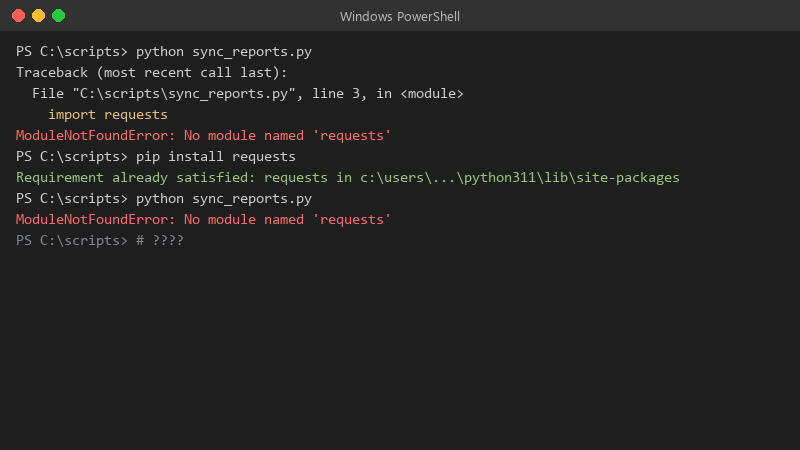
    PS C:\scripts> python sync_reports.py

    PS C:\scripts> python sync_reports.py
    Traceback (most recent call last):
      File "C:\scripts\sync_reports.py", line 3, in <module>
        import requests
    ModuleNotFoundError: No module named 'requests'
    PS C:\scripts> pip install requests
    Requirement already satisfied: requests in c:\users\...\python311\lib\site-packages
    PS C:\scripts> python sync_reports.py
    ModuleNotFoundError: No module named 'requests'
    

    Same server, same repo, same user (i think). Ive reinstalled three times and even nuked the venv once. What am i missing?

    for context, this is Python 3.10 on a plain Linux VM, nothing exotic... i'm fine at writing Python but environments have always felt like dark magic to me. any pointers on how to see what the service actually sees would be amazing. seriously need help here 😭

    thinking

    5
  2. Watch out for package name vs ipmort name. pip install python-dotenv gives you import dotenv, psycopg2-binary gives import psycopg2, PyYAML gives import yaml. If u installed a similarly named but different package the import will fail even though pip is happy. fingers crossed 🤞

    1 0 helpful
  3. hmmm activating a venv only changes PATH in your interactive shell. Services, cron and IDE run configs do not inherit that. For systemd set ExecStart=/opt/app/venv/bin/python app.py (or venv/bin/gunicorn), and for cron use the full path too. fingers crossed 🤞

    0 11 helpful
  4. oof came here to say exactly this

    8 0 helpful
  5. counterpoint to hardcoding paths: tools like pipx or uv run resolve the right enviornment for you and are less brittle when the venv moves.

    6 1 helpful

Reply to this topic

Sign in or create an account to reply.