
monday 8am, patched cloud instance, kernel panic

Solvedbootkernellinux5 replies · 279 views · started
Accepted solution by Farah W. — been there man first, boot the previous kernel. In GRUB pick Advanced options (Debian/Ubuntu/openSUSE) or teh older entry in teh list…
  1. im literally losing my mind here routine patching on our openSUSE cloud instance :) updates installed without errors, i rebooted, and this is what greeted me on the console:
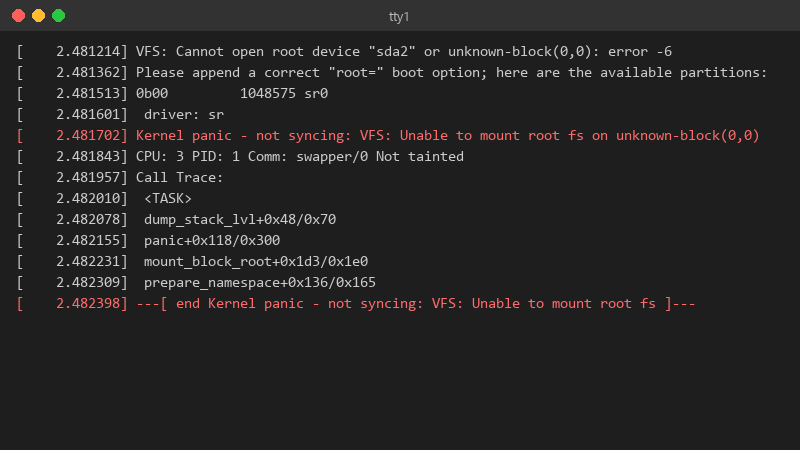
    2.481214 VFS: Cannot open root device "sda2" or unknown-block(0,0): error -6

    [    2.481214] VFS: Cannot open root device "sda2" or unknown-block(0,0): error -6
    [    2.481362] Please append a correct "root=" boot option; here are the available partitions:
    [    2.481513] 0b00         1048575 sr0
    [    2.481601]  driver: sr
    [    2.481702] Kernel panic - not syncing: VFS: Unable to mount root fs on unknown-block(0,0)
    [    2.481843] CPU: 3 PID: 1 Comm: swapper/0 Not tainted
    [    2.481957] Call Trace:
    [    2.482010]  <TASK>
    [    2.482078]  dump_stack_lvl+0x48/0x70
    [    2.482155]  panic+0x118/0x300
    [    2.482231]  mount_block_root+0x1d3/0x1e0
    [    2.482309]  prepare_namespace+0x136/0x165
    [    2.482398] ---[ end Kernel panic - not syncing: VFS: Unable to mount root fs ]---
    

    the services on this box matter. i have console access but Ive never dealt with a kernel panic before. do i reinstall?

    i can get to the GRUB menu if Im quick enough, but Im not sure whats safe to try from there. i realy dont want to make things worse. Whats teh least risky path to getting this openSUSE box running again? any ideas??

    6
  2. hmmm does the previous kernel from the GRUB menu still boot?

    9 5 helpful
  3. hmmm if teh panic mentions a module or driver, third-party modules (DKMS, out-of-tree storage or GPU drivers) may not have been rebuilt for the new kernel. dkms status shows what's built for which kernel. hope that helps :)

    4 0 helpful
  4. Accepted solution

    been there man first, boot the previous kernel. In GRUB pick Advanced options (Debian/Ubuntu/openSUSE) or teh older entry in teh list (RHEL family). If teh old kernel boots, your data is fine and the problem is the new kernel or its initramfs.

    0 12 helpful
  5. alternatively use snapshots before patching (LVM, Btrfs, or the hypervisor) so the rollback is one click instead of GRUB surgery. just my 2 cents

    1 0 helpful

Reply to this topic

Sign in or create an account to reply.