
Kernel Panic: 'Unable To Mount Root Fs' After A Power Cut Mid-Update. Is My Data GONE?

initramfskernel-paniclinux6 replies 路 78 views 路 started
  1. hmmmm ok weird one. after a power cut mid-update, my Ubuntu install panics on boot:
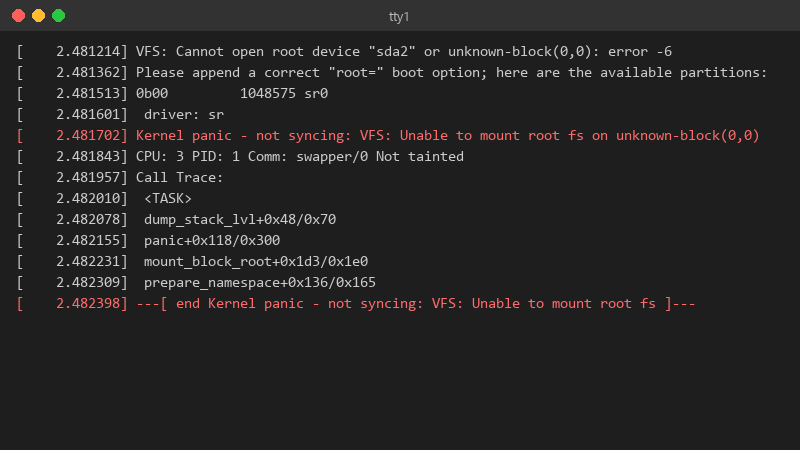
    2.481214 VFS: Cannot open root device "sda2" or unknown-block(0,0): error -6

    [    2.481214] VFS: Cannot open root device "sda2" or unknown-block(0,0): error -6
    [    2.481362] Please append a correct "root=" boot option; here are the available partitions:
    [    2.481513] 0b00         1048575 sr0
    [    2.481601]  driver: sr
    [    2.481702] Kernel panic - not syncing: VFS: Unable to mount root fs on unknown-block(0,0)
    [    2.481843] CPU: 3 PID: 1 Comm: swapper/0 Not tainted
    [    2.481957] Call Trace:
    [    2.482010]  <TASK>
    [    2.482078]  dump_stack_lvl+0x48/0x70
    [    2.482155]  panic+0x118/0x300
    [    2.482231]  mount_block_root+0x1d3/0x1e0
    [    2.482309]  prepare_namespace+0x136/0x165
    [    2.482398] ---[ end Kernel panic - not syncing: VFS: Unable to mount root fs ]---
    

    but if I pick teh previous kernel under advanced options in GRUB, it boots fine and everything works... so the disk isnt dead. whats diffreent about the new kernel entry?? id like to fix the new kernel properly instead of picking teh old one manually every morning. im guessing something didnt get generated during the update, but I dont know what to check. pls help 馃檹

    2
  2. ok but what does ls -l /boot show for teh newest kernel version? ??

    5 14 helpful
  3. sorry forgot to say df -h /boot shows the partition at 100%... i never cleaned out old kernels on this Ubuntu box. sorry for the wall of text lol

    0 5 helpful
  4. on Debian, Ubuntu, Mint and Pop!_OS, regenerate it and refresh GRUB:

    sudo update-initramfs -c -k all
    sudo update-grub
    

    on Fedora use sudo dracut --regenerate-all --force. on Arch use sudo mkinitcpio -P. good luck man!

    thinking

    9 1 helpful
  5. oof unknown-block(0,0) usually means the kernel has no initramfs, or teh initramfs lacks teh driver for your root disk. Boot the older kernel and check:

    ls -l /boot
    

    If theres a vmlinuz for teh new version without a matching initrd.img / initramfs file, thats it.

    1 3 helpful
  6. oof make a backup before u touch the cache, learned that the hard way

    4 0 helpful
  7. @ninam851 Removed two old kernels, regenerated the initramfs, ran update-grub and the new kernel boots perfectly. Backed up my photos first, just in case. Thank you! thank u thank u thank u

    5 2 helpful

Reply to this topic

Sign in or create an account to reply.
