SMSPXE.log Is Silent. Is The Request Even Reaching The DP?? lol

Solvedosdpxesccm38 replies · 490 views · started
Accepted solution by Rowan Haddad — UEFI vs legacy: make sure the boot image architecture and the device firmware match (x64 boot image for UEFI) ;) if Secure Boot is on,…
  1. PXE was working last week at the imaging bench. then teh network team swapped a switch, and now Surface devices show this:
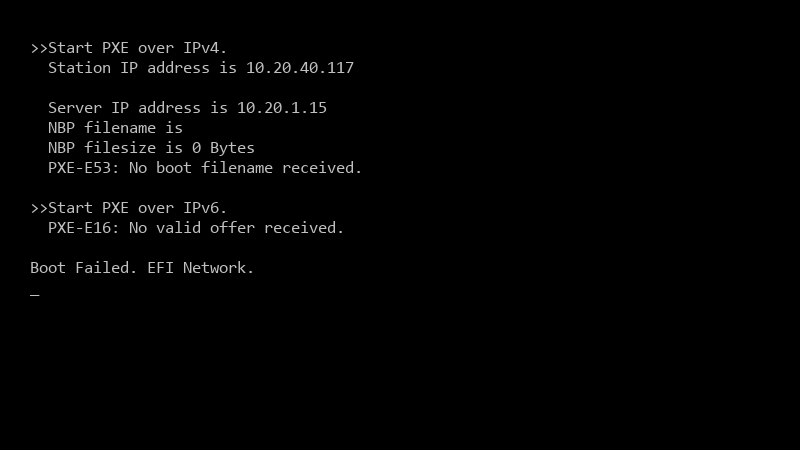
    >>Start PXE over IPv4.

    >>Start PXE over IPv4.
      Station IP address is 10.20.40.117
    
      Server IP address is 10.20.1.15
      NBP filename is
      NBP filesize is 0 Bytes
      PXE-E53: No boot filename received.
    
    >>Start PXE over IPv6.
      PXE-E16: No valid offer received.
    
    Boot Failed. EFI Network.
    

    They say teh network is fine... i say it isnt. Whos right??

    Ive already redistributed teh boot images and restarted teh WDS service on the distribution point just in case :/ Nothing changed. What would you check first before I start an argument with networking? im about to throw this thing out the window lol

    3
  2. wait does SMSPXE.log show any request with the MAC address of a failing device?

    2 0 helpful
  3. hmmmm quick q any update on this? ?

    2 0 helpful
  4. wait does this also apply to bench?

    thinking

    11 0 helpful
  5. yeahhh check the NIC driver in the boot image. if PXE starts and WinPE loads but then reboots without network, the boot image lacks the NIC driver for the Surface (often its USB-C or dock Ethernet adapter). add the driver and update distribution points.

    0 1 helpful
  6. Start on the DP with SMSPXE.log (in the SMS_DP or SMS_CCM logs folder). If u see no entry for teh devices MAC when it boots, the request isnt arriving: its a network problem. If it arrives and says something like device is not in the database or no advertisements found, its a ConfigMgr targeting problem.

    10 1 helpful
  7. wait wait does this also apply to sccm?

    3 0 helpful
  8. ok so if the device was imaged before or is a known computer without an active deployment, PXE will be ignored (abortpxe.com). Make suree the task sequence is deployed to a collection the device is in, available to media and PXE, or clear the required PXE deployment for that device.

    7 0 helpful
  9. exact same thing happeend to my old thinkpad last month good luck man!

    5 2 helpful
  10. been there man across subnets, PXE needs IP helpers (DHCP relay) on the router or layer 3 switch pointing at both the DHCP server and the PXE-enabled DP. Avoid DHCP options 66/67 if you can; they can't serve both UEFI and BIOS clients correctly. worked for me anyway 🤷

    3 4 helpful
  11. Spanning tree on accses ports delays the link coming up, so the PXE request times out before the port forwards. Enable PortFast (or edge port) on client ports. Very common after a switch replacement.

    2 6 helpful
  12. Accepted solution

    UEFI vs legacy: make sure the boot image architecture and the device firmware match (x64 boot image for UEFI) ;) if Secure Boot is on, that's normally fine with teh signed WDS/ConfigMgr boot files, but outdated boot files can fail.

    0 10 helpful

Reply to this topic

Sign in or create an account to reply.





