H.265 4:2:2 10-BIT CLIPS IMPORT AS OFFLINE. IS MY COMPUTER TOO OLD?
been there man H.265 (HEVC) comes in many flavours, and 4:2:2 10-bit is the hardest one. hardware decoders on many GPUs and CPUs only handle 4:2:0, so 4:2:2 falls back to software decoding, which is very slow or, in some editors and editions, not supported at all.
Options, roughly in order:
- Check whether your editor's paid edition or a newer release supports this format. Free editinos sometimes limit hardware decoding.
- Check ur hardware's supported decode formats; some newer GPUs and CPUs do handle 4:2:2 HEVC. 3 ;) Transcode to an editing-friendly intermediate codec and edit that instead.
Free edition, on a machine with a mid-range GPU from a few years back. Integrated graphics on the CPU too. sorry for the wall of text lol
oof fun problem! tarnscoding with ffmpeg to DNxHR HQX keeps 10-bit and 4:2:2 and plays smoothly in basically every editor:
ffmpeg -i C0042.MP4 -c:v dnxhd -profile:v dnxhr_hqx -pix_fmt yuv422p10le -c:a pcm_s16le C0042.movFiles get much bigger, so plan disk space. ProRes 422 HQ is the other common choice and works the same way.
keep us posted!

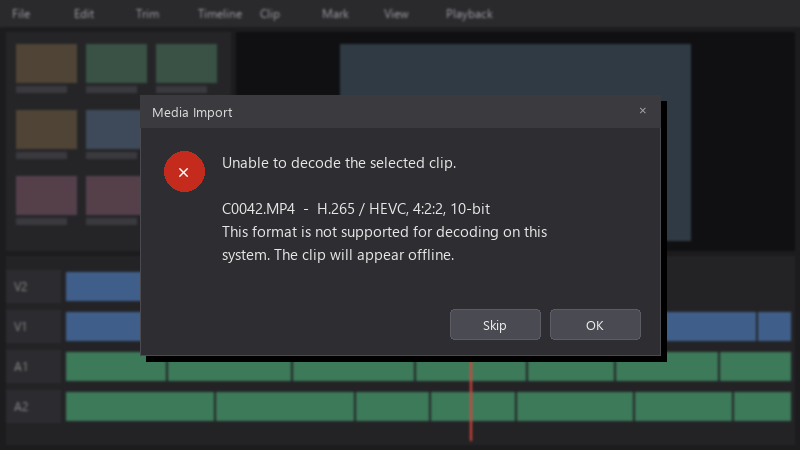 pls help 🙏





Reply to this topic
Sign in or create an account to reply.