Is 8 GB Of VRAM Really Not Enough Anymore?

crashdirectxvram15 replies · 302 views · started
  1. I was playing a big-budget shooter on my RX 6600 with a high-res texture pack, and after about half an hour it crashed with this:
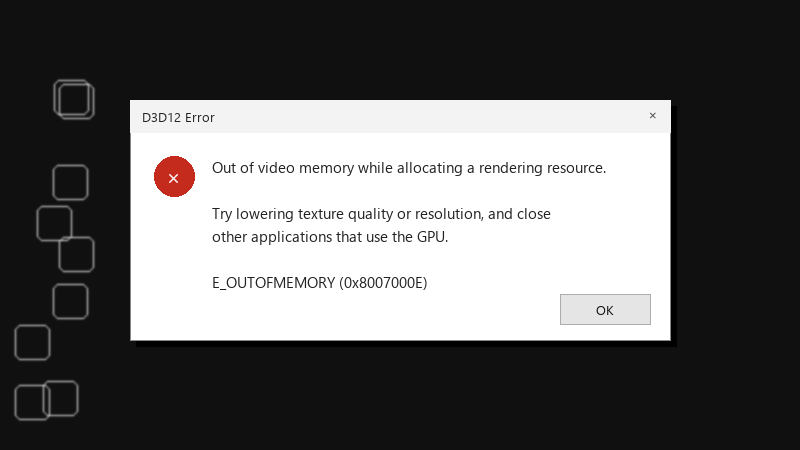
    D3D12 Error

    D3D12 Error
    Out of video memory while allocating a rendering resource.
    
    Try lowering texture quality or resolution, and close
    other applications that use the GPU.
    
    E_OUTOFMEMORY (0x8007000E)
    

    The frame rate was fine right until the crash 🔥 I thought my card was decent, but now I'm wondering if it just doesn't have enough VRAM for newer games. Which settings should I lower first without making the game look terrible?

    I'd rather not drop everything to low if there's a smarter way. I'm happy to experiment with settings one at a time and report back with what helps.

    thinking

    4
  2. Does the crash happen with textures one step lower? ??

    0 1 helpful
  3. wowww ok ok update: did what @theo_cron said and its fine now owe u a beer 🍺

    0 9 helpful
  4. ahh right browser with a bunch of tabs, a chat app and a video playing on teh second screen. sorry for the wall of text lol

    7 1 helpful
  5. lol same thing happened to me texture quality is teh setting with the biggest VRAM impact. Drop it one step first. On most cards it costs less visual quality than lowreing resolution or turning off effects. worked for me anyway 🤷

    5 6 helpful
  6. hmmm close browsers and apps that use hardware acceleration while gaming. They can take a surprising amount of VRAM in the background.

    2 0 helpful
  7. Watch real usage with an overlay or in Task Manager's Performance > GPU tab under Dedicated GPU memroy. If it sits right at the limit, you're running out.

    0 5 helpful
  8. ok so ray tracing and frame generation both use extra VRAM, on cards with 8 GB or less, turning those off is often what stops teh crashes. worked for me anyway 🤷

    7 2 helpful
  9. oh ive been there lol following, haivng the same problem

    1 4 helpful
  10. been there man on laptops, make sure the game runs on the dedicated GPU: Settings > System > Display > Graphics, select the game and choose High performance. hope that helps :)

    0 0 helpful
  11. honestly some new games just have memory leaks at launch... if usage keeps climbing over time, wait for a patch rather than lowering everything.

    2 2 helpful
  12. my homelab box is officially hautned

    0 0 helpful
  13. @bob32 holy cow textures down one notch and a high-res texture pack off, and a big-budget shooter on my RX 6600 has been stable for days. Looks almost the same.

    0 0 helpful

Reply to this topic

Sign in or create an account to reply.